

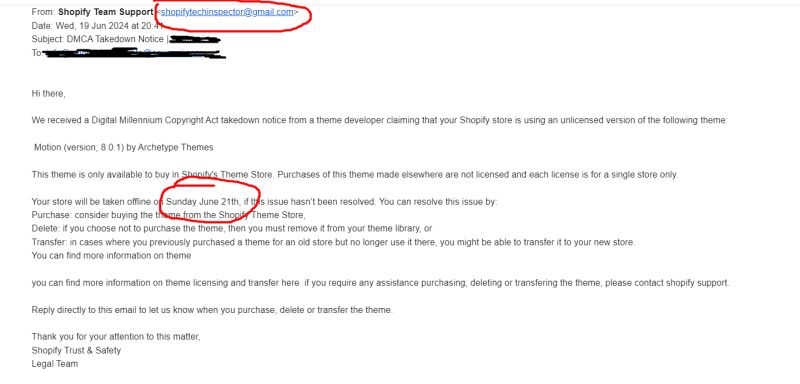
A client of mine got an email last week claiming Shopify was about to take their store offline. The email was a fake. Two details gave it away within minutes, and the lesson it carried is one every Shopify merchant should have in muscle memory before the next one of these lands.
We have run client stores on Shopify for years, and the rule we work by at MageCloud is simple: every theme one of our clients uses is bought legitimately. We do not clone, copy, or re-use themes across stores. So when a DMCA takedown notice arrived in a client’s inbox claiming exactly the opposite — that the store was running an unlicensed version of a theme the client had actually paid for in full — the first instinct was not panic. It was to read the email twice and look for what the scammer hoped we would miss.
MageCloud Fraud Alert Note
How to Spot a Fake Shopify Takedown Email
FROM ADDRESS
Should end in @shopify.com
The fake email came from [email protected].
DATE LOGIC
Day of week must match the date
“Sunday June 21th” was actually a Friday in 2024.
ACTION
Forward to [email protected]
Confirm via official Shopify chat before clicking anything.
Paul Ryazanov · MageCloud · a decade of running ecommerce stores on Shopify, Magento, and WooCommerce
The From Address Gave It Away First
The first place I look on any email that threatens to take a store offline is the from address. Real DMCA notices, real billing emails, real legal communications from Shopify all come from a verified @shopify.com domain. This one came from [email protected]. A gmail address. With a made-up-sounding handle.
That is not a subtle tell. It is the kind of slip a normal spam filter would catch on a quiet day, but the scammers are getting better at writing the body of the email to read as official, and a stressed merchant who skims the from line can absolutely click through and start paying for a theme they already own. Reading the from address first, before reading a single word of the body, is the cheapest habit any Shopify operator can build.
If you ever cannot tell whether an address is real, the rule I use is to ignore the email entirely, go to shopify.com directly in a new browser tab, log in, and check the messages section inside the admin. If there is no parallel notification there, the email is almost certainly not real.
The Date That Did Not Add Up
The second tell was harder to spot but more interesting. The email warned that the store would be taken offline on “Sunday June 21th” if the issue was not resolved. Set the “21th” suffix aside for a moment — that alone would raise an eyebrow. The bigger problem is that June 21st in 2024 was a Friday, not a Sunday.
That kind of mistake almost certainly comes from a template. The scammer wrote the email weeks earlier, picked a future date for the deadline, and never recalculated the day of the week when the email finally went out. Shopify’s real legal team would never do this. Their notices are generated by infrastructure that pulls the date from a real calendar, and the day always matches.
When you can spot a date-and-day mismatch like this, treat it as a hard signal. No legitimate corporate email system gets this wrong. Every fake one I have looked closely at eventually does.
What I Did Next, and What I Would Tell Any Merchant to Do
Once both tells were obvious, the next move was straightforward. We forwarded the email to [email protected], which is the channel Shopify uses to investigate phishing and impersonation reports. We also opened a chat through the official Shopify admin to confirm there was no real takedown action against the store, which there was not.
The whole investigation took less than fifteen minutes. The total cost of not doing it would have been higher. A panicked client might have paid for the “license” through whatever link the scammer eventually planned to send, or, worse, handed over admin credentials to “resolve the issue.”
If you are running a Shopify store and a similar email arrives, the steps are the same:
- Read the from address before reading the body.
- Check the date logic against a calendar.
- Forward suspicious messages to
[email protected]. - Open an official chat through your Shopify admin to confirm.
The same playbook applies to scam emails dressed up as Stripe, PayPal, your hosting provider, or any other vendor your store depends on. The wrapper changes. The tells do not.
The Bigger Lesson Beyond This One Email
Most scam emails work because they bypass the place a merchant would normally do verification, which is their own development team or agency. They land in a founder’s personal inbox at 9pm, they look urgent enough that the founder takes action before sending the email anywhere else, and the scammer wins on the gap between panic and a second pair of eyes.
If you have a development team or an agency you trust, the right move is to forward anything that looks like a legal threat, an unexpected invoice, or a sudden takedown notice to them before you click. That is part of what we are paid for at MageCloud — to be the second pair of eyes that catches what the scammer needed you to miss. The same instinct sits behind the daily monitoring stack I run on every ecommerce site: catch the problem at the layer where catching it is still cheap.
Site security is one more layer of the same discipline I wrote about in what a failed WooCommerce to Shopify migration teaches about SEO and site security. The platform is one variable in your risk profile. The verification habits you build around it matter more than most operators realise.
This particular scam will get rewritten by next month. The next one will use a different sender domain, a different date, a different vendor name in the signature line. The tells will be in the same places. Train yourself to look there first.
Where to Find Me Next
If you have caught a scam email worth comparing notes on, or you want to talk through the verification habits we have built into MageCloud’s client communication, come find me at the next Ecommerce Camp UK. The marketplace room always has at least one of these stories going.
Related reading: Why One Project Board Beats Three Agency Meetings — the ‘second pair of eyes’ habit scaled across an entire agency stack, not just a single suspect email.
Related reading: Why Every Ecommerce Store Needs a Fresh Pair of Eyes — the second-pair-of-eyes habit extended from suspect emails to the entire store at once.
Related reading: Ask ChatGPT About Your Brand Before Customers Do. How the scam that impersonated our brand ended up inside the AI answers about us.