

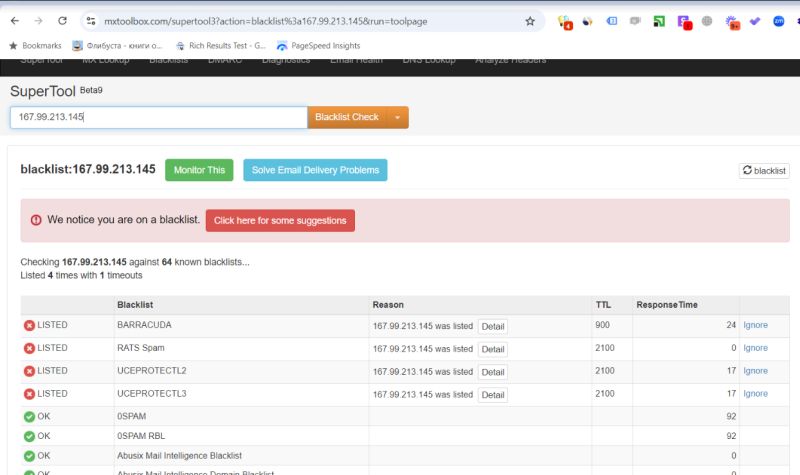
Do this before moving your site to another hosting provider, and learn it from our experience rather than your own. We were migrating a customer off a DigitalOcean server to a managed hosting service. The new server went up cleanly, the code and everything else transferred, and the process looked smooth and successful by every check we normally run. Then we discovered the problem that none of those checks cover: the IP address of the new server was already blacklisted by three different providers.
We had done nothing wrong, and neither had the client. The IP came pre-poisoned. Whoever held that address before us had earned it a reputation, and the reputation conveyed with the lease. Now the job is to re-clone the server, change the DNS settings again, and confirm the replacement IP is actually clean before anything points at it. A similar thing happened with our own IP on a completely different hosting provider, which is what makes this a pattern worth writing down rather than an anecdote.
MageCloud Migration Note
The Pre-Owned IP Problem
WHAT HAPPENED
A clean migration onto a dirty IP
New managed server, successful transfer, and an IP address already listed on three blacklists before we sent a single byte from it.
WHY IT HAPPENS
IPs are recycled, reputations included
Cloud providers reuse addresses constantly. Any IP you are assigned could have spent last year sending spam for someone else, and the blacklists do not know you arrived.
THE CHECK
mxtoolbox.com, before DNS moves
Find the new server’s IP and run it through the blacklist check. Two minutes. Make it a standing item on every migration checklist, and run it on your current server today.
Paul Ryazanov · MageCloud · we inherit servers, not reputations
What a Blacklisted IP Actually Costs a Store
The blacklists in the screenshot, Barracuda, UCEPROTECT and friends, are consulted primarily by mail systems, which is why the first casualty is email. Order confirmations, shipping notices, password resets, abandoned-cart flows: transactional mail from a blacklisted IP starts landing in spam or vanishing outright, and the store experiences it as customers mysteriously not receiving things. Nobody’s inbox tells you why. The failure arrives as a slow leak of support tickets and quiet revenue damage.
The trap is that none of it shows up in a migration test plan. The site loads, checkout works, certificates are green, everyone congratulates the team. The reputational layer is invisible from inside the server, exactly like the cron job that nobody verified after the move. Failures cluster around changes, and the post-change verification pass has to include the layers you cannot see by browsing the site.
The Two-Minute Ritual, and When to Run It
The fix is almost insultingly simple, which is the point of writing it down. Find the IP address of your server, run it through mxtoolbox.com’s blacklist check, and read the result. Run it at three moments. Before a migration, on the new server, while changing course costs nothing: a dirty IP at this stage means asking the host for a different address or re-provisioning, an email and an hour. After any provider-side change, because addresses get shuffled. And honestly, today, on whatever you are running right now, because our own IP turned up listed on a provider where we had changed nothing. Key fact: these addresses are always changing hands, and any IP could have been used by someone else before you.
If you find yourself listed, the response depends on the cause. An inherited reputation usually clears through the blacklists’ own delisting processes plus time, or faster by swapping to a clean IP, which is the argument for catching it pre-DNS. A listing on your established IP is a different conversation, sometimes it means a compromised site is actually sending spam, which is its own security investigation. Either way, knowing beats not knowing by a margin measured in lost orders.
Migration Checklists Earn Their Keep in the Weird Items
No matter how well-prepared you are, unexpected problems occur, that is the honest lesson of this story. But every weird failure that costs you a week earns its line on the checklist so it never costs a week again. Ours now reads: verify scheduled jobs on the new machine, verify sitemaps and Search Console after cutover, and check the new IP against the blacklists before DNS moves an inch. The list is built from scars, like everything else in how we run migrations.
So, a key task for today: find your server’s IP address and verify it on mxtoolbox.com. If it comes back dirty and you want help working out whether it is inheritance or infection, get in touch. Both are fixable. Only one of them is urgent.