

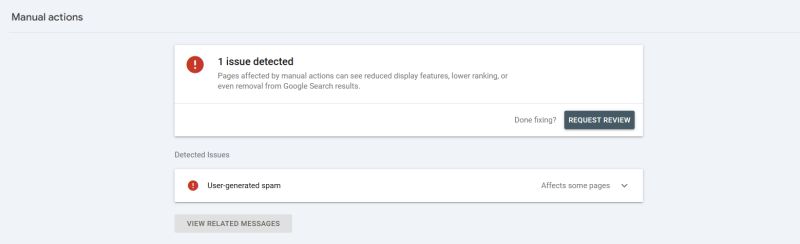
How do you verify that your SEO agency is not doing a good job in three seconds? Here is the entire procedure. Go to Google Search Console. Open Security and Manual Actions in the left navigation. Click Manual actions. If you see something like the image on this post, one issue detected, user-generated spam, affecting some pages, then your agency is probably not paying much attention to your project, and you have learned it in less time than their report takes to open.
The reason this check is so brutal is what a manual action actually is. It is not an algorithm being moody. It is a human reviewer at Google looking at your site, finding a violation, and leaving you a written notice with a Request Review button attached. It is the single most explicit communication Google ever sends a site owner, and it sits in exactly the place an SEO professional is supposed to look first.
MageCloud Three-Second Note
What the Panel Tells You
WHAT A MANUAL ACTION IS
A human at Google flagged your site
Not an algorithmic wobble. A written penalty notice, with the affected pages and the reason, demoting or removing pages from results until fixed.
WHAT IT MEANS IF ONE IS SITTING THERE
Nobody on retainer is looking
The notice arrives in the one console every SEO engagement claims to monitor. An unaddressed flag is proof of unwatched access.
THE COST OF THE CHECK
Three seconds, zero expertise
GSC, Security and Manual Actions, Manual actions. Green tick or red flag. That is the whole audit.
Paul Ryazanov · MageCloud · the panel your retainer is supposed to be reading
Why an Ignored Flag Is the Whole Verdict
Be precise about what an unaddressed manual action proves, because it is not that your agency caused the problem. User-generated spam, the flag in this screenshot, is usually outside anyone’s content plan: junk profiles, comment spam, forum abuse on some forgotten subdirectory. No shame in the flag appearing.
The shame is in it remaining. A manual action generates a message in Search Console the day it lands. Fixing the underlying spam and clicking Request Review is bread-and-butter remediation work, the kind an engaged vendor does within the week and then writes a slightly heroic email about. A flag that sits there for months means nobody with access has looked at the most important panel in the console for months, while the affected pages sat demoted or delisted. Every invoice that arrived during those months billed for attention that observably did not happen. That is why this beats every other verification shortcut I have given you, including the deeper three-step audit: it requires no interpretation. The evidence is binary and timestamped.
Run It Yourself, Today, Without Telling Anyone
The operational beauty of this check is that it needs no SEO knowledge, no tools, and no conversation with your vendor. You need access to your own Search Console, which you should have anyway and must reclaim if you do not. Three clicks. A green “No issues detected” means this particular failure mode is absent, it does not certify the engagement, but the red version is conclusive in one direction.
While you are in there, glance one panel up at Security issues too, same logic, worse consequences: that is where hacked-site and malware flags appear, and an ignored one of those is a genuine incident in progress, not just a neglected retainer.
If You Find a Flag
Two tracks, run both. The technical track: identify the affected pages from the notice, clean up the spam, lock the door it came through, comment moderation, registration controls, whatever fits, and submit the review request with a short honest description of the fix. Google’s reviewers process these in days to weeks, and recovery is the norm.
The vendor track is the harder conversation, and the flag’s timestamp is your agenda. When did this land, who had access, and why did I find it before you? There are acceptable answers for a flag that is a week old. There are no acceptable answers for one older than a billing cycle, and you should price the relationship accordingly, the way every engagement should be priced: on verified attention rather than reported activity.
If you run the three-second check and find something red, and you want help with either track, the cleanup or the conversation, get in touch. The fix is usually quicker than the months it sat there waiting for somebody to look.