

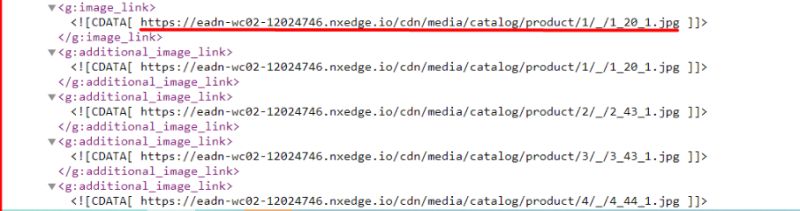
Our client asked for something routine: connect the ecommerce store to Google Merchant Center so the catalogue could flow into Google Shopping. We set it up, the feed validated, and everything was working fine, except Google kept rejecting the product images. The frustrating kind of rejection, too. Accessing the image URLs directly, they appeared to work without any issue. Browser loads them, human sees them, Google says no.
When a check passes for you and fails for Google, the difference is always in who is asking and how. It turned out the problem was the CDN service sitting in front of the catalogue images, the third-party domain you can see in the feed XML attached to this post. Googlebot’s image fetcher was being served differently than a browser, and Merchant Center graded what it was given. The merchant saw working images. Google saw rejects.
MageCloud Feed Note
The Mystery, Decomposed
THE SYMPTOM
Images fine in browser, rejected in feed
Direct URL access worked everywhere a human checked. Merchant Center disapprovals kept arriving anyway.
THE CULPRIT
The fancy CDN in the middle
Bot handling, rate limiting, or geographic quirks in the image CDN meant Google’s fetcher got a different experience than a browser.
THE FIX
Cloudflare, pointed at directly
Nowadays, use Cloudflare and point your domain straight at it. You do not need any other fancy CDN, and Google’s crawlers are first-class citizens there.
Paul Ryazanov · MageCloud · infrastructure should be too boring to debug
Why CDNs Fail for Bots While Working for People
A CDN sits between your origin and every requester, deciding how to respond based on who seems to be asking. That is its job, and it is exactly the failure surface here. Aggressive bot protection that challenges or throttles automated fetchers. Rate limits tuned for human browsing that trip when Google pulls ten thousand product images in a burst. Edge nodes that serve one region beautifully and time out from wherever Googlebot fetches. Hotlink rules that misread the crawler. None of it is visible from your office chair, because your office chair sends human-shaped requests.
Merchant Center is unforgiving about this in a way regular SEO is not, because the feed pipeline re-fetches images continuously and disapproves items on failure. Each disapproved item is a product missing from Shopping, and Shopping is not an optional channel anymore, it is where the commercial SERP actually lives. An image-serving quirk quietly converts into missing shelf space at Google scale.
The Case for Boring Infrastructure
The fix we gave the client is the advice from the original post, unchanged: nowadays, please use Cloudflare and point your domain directly to it. You do not need another fancy CDN. Not because Cloudflare is magic, but because it is the most boring possible choice, the biggest crawler-aware network with sane default behaviour toward Googlebot, plus the global cache and image handling that the exotic CDN was bought for in the first place.
This is the same argument I make about oversized AWS clusters, arriving from a different direction. Every additional piece of clever infrastructure is another party between your store and your customer, and another place where behaviour can fork between humans and bots without anyone noticing. The specialist CDN was someone’s reasonable decision once. The cost only became visible when a channel that matters started silently grading its behaviour. Default to boring, deviate only when a measured need forces you, and remember that a stack you cannot quickly reason about is a silent failure waiting for its moment.
How to Check Your Own Feed This Week
Three looks, cheapest first. Open Merchant Center and read the item disapprovals; image-related rejections on products whose images look fine to you are this exact pattern. Second, identify what actually serves your product images, the domain in your feed’s image_link fields, because plenty of merchants do not know a CDN migration ever happened. Third, if the serving domain is some specialist CDN and you have unexplained image disapprovals, test the move to boring: Cloudflare in front, direct pointing, and watch the disapprovals drain.
The pattern generalises beyond images: whenever Google reports a failure you cannot reproduce, stop checking as yourself and start asking what is different about how Google asks. That single question solves half the mysteries in this business. If you would rather hand the mystery to someone who has seen it before, get in touch. Feed plumbing is not glamorous work, which is exactly why it is so often the thing quietly costing the revenue.